

 ShareNarrate · for Android and iOS
Share. And listen.
ShareNarrate gives a voice to what you share.
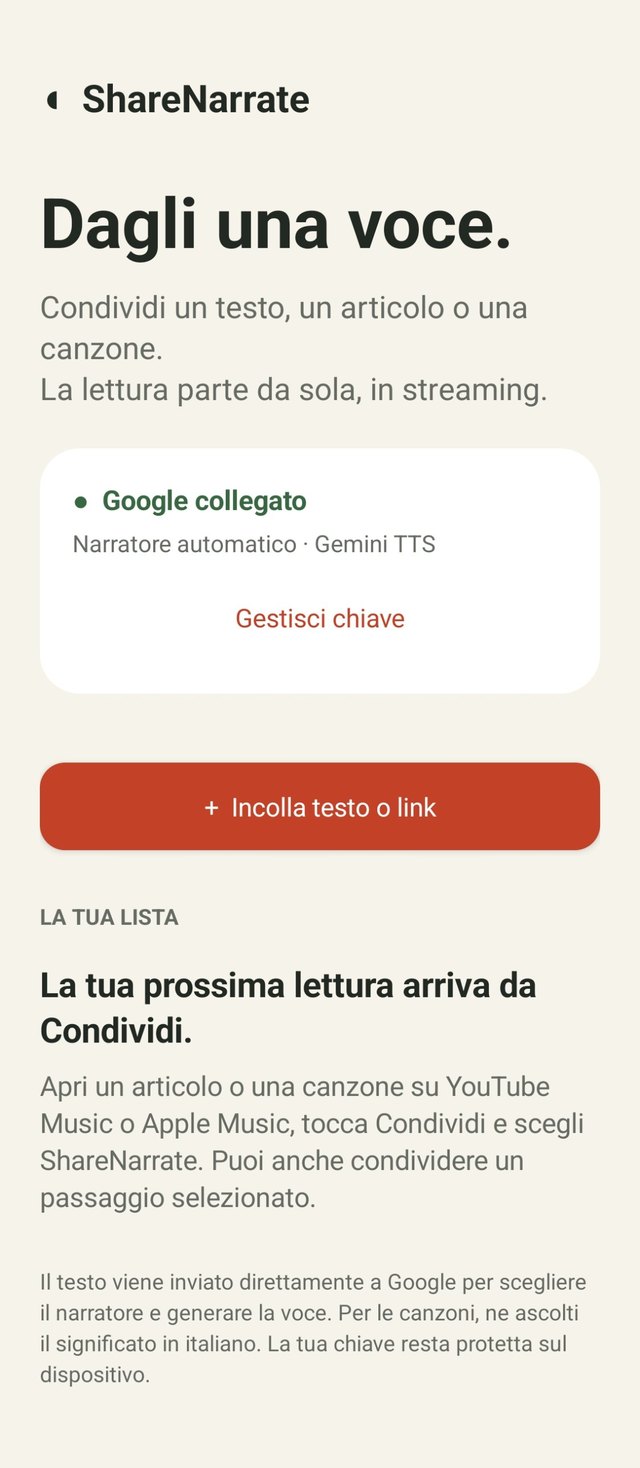
An Android and iOS app that turns texts, web articles, songs or other content into audio you can listen to. From the Share menu choose ShareNarrate and reading starts automatically, without pressing “Listen”.
It uses Google Gemini TTS streaming: audio plays as soon as the first fragments arrive, without waiting for the full generation.

The Android download link will be set up before publication.

How it works
Share → listen.
-
01
Share a text, a link, a song or other content
From an article, a public ChatGPT answer, a track or another app, tap Share and choose ShareNarrate. You can also share just a selected passage.
-
02
Reading starts by itself
You don't need to press “Listen”. Audio plays as soon as the first fragments arrive, without waiting for the full generation. From web pages ShareNarrate extracts the readable text.
-
03
Resume whenever you like
Readings stay in your personal library, with pause, resume and speed control.
What you can listen to
What you would read, to listen to.
Web articles
ShareNarrate extracts the readable text from the page.
Texts and passages
Paste a text or share only the selected part.
ChatGPT answers
Publicly shared answers, to listen to at your leisure.
Songs
History and possible meanings of tracks from YouTube Music and Apple Music.
The narrator
A voice that adapts to what it reads.
The narrator automatically chooses voice and tone based on the content you share.
Empathetic
For the most personal and reflective texts.
Narrative
For tales, stories and long reads.
Informative
For articles, news and in-depth pieces.
Enthusiastic
For lighter, more energetic content.
Library
Your readings, always within reach.
Every text you share stays in your personal library. You can pause it, resume from where you were and adjust the reading speed.
- Pause and resume.
- Speed control.
- All readings stay in the personal library.
Songs
Songs, told in Italian.
Share a single track from YouTube Music or Apple Music: ShareNarrate recognizes the song, retrieves its lyrics and, with the same approach as NoteNarrate, tells in Italian its story and possible meanings, exploring themes, emotions and symbols.
- Track recognition and lyrics retrieval.
- If the lyrics are missing, you can enter them manually.
Interpretations are possible readings, not truths about the song.
Your Google key
Connect your key. It stays on your phone.
Use your free Google API key, which you create in Google AI Studio, for the best narrated-voice experience with Google's new TTS features. The key is kept encrypted on the device; content is processed directly by Google and usage follows its quotas and rates.
- Key kept encrypted on the device.
- Content is processed directly by Google, to choose the narrator and generate the voice.
- You can manage or replace the key from the app.
Without a Google key, ShareNarrate uses the phone's system speech synthesis: it works, but it is far less engaging than the voice narrated by Google.
Platforms
For Android and iOS.
Android
ShareNarrate appears in your phone's Share menu, next to the other apps.
The Android download link will be set up before publication.
iOS
Share texts and articles with ShareNarrate from your iPhone and listen to them aloud.
FAQ
Frequently asked questions
No. When you choose ShareNarrate from the Share menu, reading starts automatically. Audio plays as soon as the first fragments arrive, without waiting for the full generation: it may still take a few moments to begin.
From web pages ShareNarrate extracts the readable text. Not all pages are alike and in some cases the extraction may be incomplete: you can always select a passage and share that text directly.
Yes, the ones shared publicly: share the answer's link and choose ShareNarrate.
Share a single track from YouTube Music or Apple Music. ShareNarrate recognizes the song, retrieves its lyrics and tells in Italian its story and possible meanings. If the lyrics aren't found, you can enter them manually.
For Google's voice you need your own API key, which you create for free in Google AI Studio. Usage follows Google's quotas and rates.
Yes: without a key ShareNarrate reads with the phone's system speech synthesis. It works, but it is far less engaging than the voice narrated by Google, which also chooses voice and tone based on the content.
The key stays on your phone, in encrypted form. The content you share is processed directly by Google to choose the narrator and generate the voice.

Give it a voice.
Share a text, an article, a ChatGPT answer or a song, and listen.
The Android download link will be set up before publication.
More apps from Archetipi Digitali
 AIquoteLa quota Codex, a colpo d'occhio.Discover AIquote
 ShakeLensAsk about what you see.Discover ShakeLens
 AutohotspotLike on iPhone, but on Android.Discover Autohotspot
 NoteNarrateListen to music. Discover the stories it tells.Discover NoteNarrate
 PodClearThe ad blocker for podcasts.Discover PodClear
 GoneDrag a photo. Erase the extras.Discover Gone