
 Autohotspot
Like on iPhone, but on Android.
Connect your Mac to your Android phone's hotspot with one click.
Autohotspot turns the hotspot on over Bluetooth and connects the Mac to the phone's Wi-Fi network, without having to pick up the phone and open settings.
For Mac · Requires the Autohotspot companion on Android and Shizuku
Autohotspot is used on the Mac.
How it works
One click from the Mac. The phone stays in your pocket.
-
01
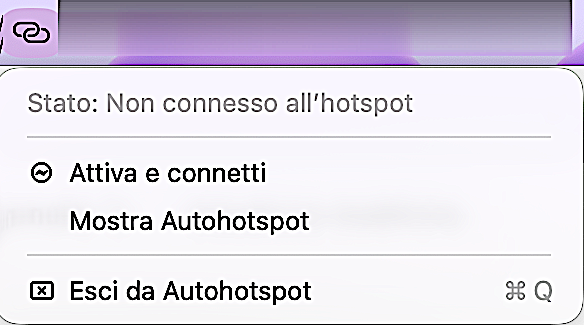
Click “Turn on and connect”
From the Autohotspot menu in the Mac menu bar.
-
02
The phone turns on the hotspot
The Mac asks for it over Bluetooth from the Autohotspot companion on the Android phone.
-
03
The Mac connects
The Mac joins the phone's Wi-Fi network, without opening the phone's settings.
Always within reach
To work and browse even away from home.
-
Without picking up the phone
No need to unlock the phone or open settings to turn on the hotspot.
-
In the menu bar
Autohotspot is always within reach in the Mac menu bar, with the connection status in view.
-
Wherever you are
On the train, at a café or at a client's: the Mac uses your Android's connection with one click.
First setup
What you need.
- MacAutohotspot in the menu bar, with Bluetooth and Wi-Fi on.
- Android phoneThe Autohotspot companion installed on the phone, with Bluetooth on.
- ShizukuTo be set up once on the phone: it lets the companion turn on the hotspot. Details are in the FAQ.
- Mobile dataThe hotspot uses the phone's data network: your plan's limits apply.
FAQ
Frequently asked questions
Shizuku is a free, open-source Android app that lets other apps use some system functions with Android debugging (ADB) permissions, without root. It is started from the phone with wireless debugging, by connecting it once to a computer with ADB or, on rooted phones, directly.
Android doesn't allow regular apps to turn on the hotspot. Shizuku gives the Autohotspot companion the permission it needs to turn it on when the Mac asks over Bluetooth, without root and without you having to touch the phone.
The initial setup is done only once. On phones without root, though, Shizuku has to be restarted after every reboot: usually it's enough to turn wireless debugging back on and start it from the app.
No. Shizuku also works without root, through wireless debugging.
With iPhone you don't need it: the Mac already offers Apple's Instant Hotspot. Autohotspot brings a similar experience to Android phones.
No. After setup you turn on the hotspot from the Mac with “Turn on and connect”: the phone can stay in your pocket or bag.
Yes, like any hotspot: the Mac browses using the phone's data connection and your plan's limits apply.
Your Android's hotspot, one click from your Mac.
Always within reach in the menu bar, to work and browse even when you're away from home.
Autohotspot is used on the Mac.