01
In sight while you work
Your Codex and Claude quotas stay in the menu bar. Open the panel for the details.
 AIquote, by Archetipi Digitali
AIquote shows how much is left of your Codex and Claude quotas and when they renew, right in the Mac menu bar. Connect one or both accounts and keep working.
For macOS · Codex and ClaudeClaude: sign in with email and code
Open this page on your Mac to install AIquote.
It shows the Codex quotas of your ChatGPT account and the usage limits of your Claude account, not a general message count.
How it works
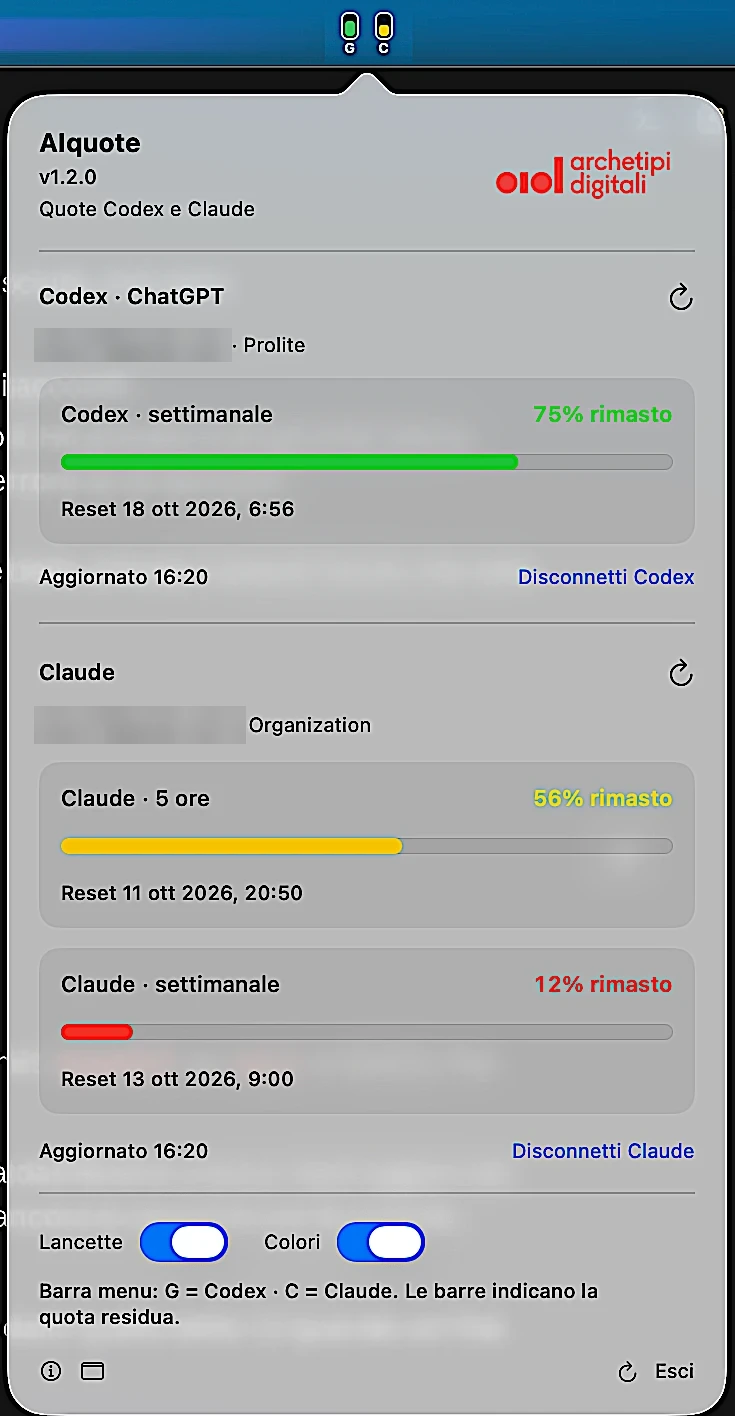
With Needles on you see a gauge if you connected a single account, or two vertical bars, G for Codex and C for Claude, if you connected both. Turn them off to read the percentage of the service chosen in “Percentage in bar”. Turn on colors to recognize the available level at once.
The slider and states act on the example service chosen above.
Codex: 68% · High quota — Claude: 100% · High quota
The dashboard shows Codex and Claude together, without tabs. The indicators follow the connected accounts: G shows Codex's main window, C favors Claude's 5-hour quota. A dash or a question mark means an unknown quota, not zero. Other windows and reset times depend on the data returned by the accounts.

Example account · Pro
Example organization
Menu bar: G = Codex · C = Claude. The bars show the remaining quota.
01
Your Codex and Claude quotas stay in the menu bar. Open the panel for the details.
02
Read the percentage of the service you choose, or turn on Needles: a gauge with one account, the G and C bars with Codex and Claude. Monochrome mode is still available when you want a more discreet indicator.
03
Check the reset of the windows returned by each account. AIquote refreshes the data every five minutes and lets you request a new reading.
Installation and sign-in
Download the Mac app and move it to Applications.
Codex: press “Sign in with ChatGPT” and complete sign-in in the browser through OpenAI. Claude: sign in with email and code and choose the profile, personal or Team (see below).
With Needles on you see the gauge or, with two accounts, the G and C bars; off, the percentage of the service chosen in “Percentage in bar”. Choose whether to use colors.
Claude connects only with email and code, in AIquote's internal window. You don't need Claude Code, the terminal or Safari open.
Google and SSO are not supported. Don't use “Continue with Google”: always choose email and code. The code isn't necessarily written in the email, it is generated by the link you open; if it doesn't appear, request a new email from the Claude page. Don't share links, cookies or sign-in codes.
Personal or Team profile. The same sign-in can use the personal profile and a Team organization: with a company license, choose the organization's name in the Claude account menu. The free personal profile may not show percentages: missing data doesn't mean the quota is used up, and AIquote doesn't estimate what's left. Team quotas belong to the individual member, not the whole team.
After signing in you don't need to keep a terminal, a browser page or Claude Code open.
Privacy and control
Codex: browser sign-in through OpenAI. Claude: email and code in the app's internal window.
AIquote keeps credentials in the Mac's Keychain. No session is imported from other apps.
The monitor does not send your quotas or credentials to Archetipi Digitali's servers.
AIquote does not read conversations and does not send prompts. Disconnect removes the local link to the selected service.
This information concerns the AIquote app. Browsing this site follows the Archetipi Digitali website's privacy notice.
FAQ
It shows the Codex quotas available for the connected ChatGPT account and, if you also connect Claude, the quota of your Claude account. It is not a general counter of messages or of all models.
Only with email and code, in the app's internal window: press “Connect Claude with email”, choose “Continue with email”, open the link you receive (even on your phone) to get the code and enter it on the page still open on your Mac. Then press “I've completed sign-in — read the quotas” and choose the profile. Google and SSO are not supported. You don't need Claude Code, the terminal or Safari open.
Yes. The same sign-in can use the personal profile and a Team organization: with a company license, choose the organization's name in the Claude account menu. Team quotas belong to the individual member, not the whole team, and the administrative spending and credits page is separate from personal quotas. The free personal profile may not show percentages; to check on the Claude site, choose the team, then Settings and Usage.
Yes, at least one of the two. For Codex a ChatGPT sign-in is enough: you don't need an API key. The available data depends on your plan and on the windows returned by OpenAI and Anthropic.
Yes. You can connect one or both accounts. The dashboard shows them together, and each has its own controls to refresh and disconnect; “Refresh both” rereads all quotas.
With Needles on and a single account connected you see a gauge; with Codex and Claude connected two vertical bars appear: G shows Codex's main window, C favors Claude's 5-hour quota. With Needles off you see a percentage, and with “Percentage in bar” you choose whether it refers to Codex or Claude. Other quotas and resets are in the panel.
No. The browser is only needed to sign in to Codex, while Claude uses the app's internal window. After signing in the monitor keeps going as long as AIquote is running.
Yes. The Colors control applies to the percentage, the gauge and the G and C bars.
AIquote reports missing data or an update problem: a dash or a question mark means an unknown quota, not zero. Missing data doesn't mean the quota is used up: AIquote doesn't estimate what's left and doesn't invent 0% or 100%. An update error does not disconnect the account, and the profile choice stays available.
It can happen. Claude doesn't offer a public API for quotas, so AIquote uses a web session: if Anthropic changes the service, the connection may break until a new version of the app is released.
On macOS 13 or later, on both Apple silicon and Intel Macs.
The app doesn't update itself. Download the new version from this page, quit the previous AIquote with Quit without disconnecting the accounts, and drag the new app into Applications, replacing the old one. If asked, allow access to its Keychain or reconnect the provider concerned. Don't delete data or sessions.
No. AIquote is developed by Archetipi Digitali s.r.l. and is independent from OpenAI and Anthropic.
A small indicator to know how much you have left while you work.
For macOS · Codex and Claude
Open this page on your Mac to install AIquote.